Breadboarding, shaping, slicing, and steelthreading solutions with AI agents

I’ve recently been interested in what the new way of product development, aka “process”, would or might look like. I’m highly skeptical about the traditional product design process which looks like a double diamond loop, and don’t think that would remain as it is in 2026 and beyond. Everything is breaking apart (or) evolving, and I don’t think the double diamond as a gold standard would remain in stasis.
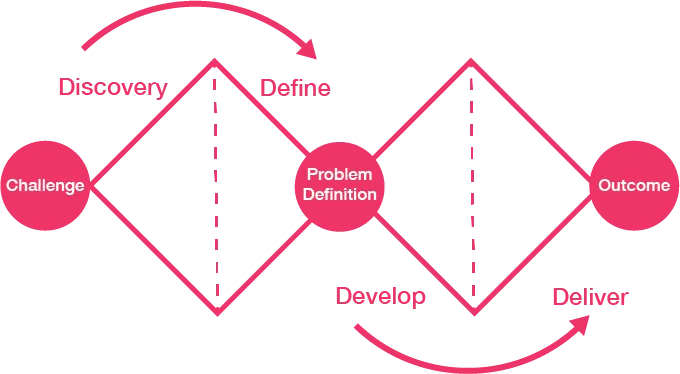
With this in the back of my mind, I was scrolling X when I found this lengthy essay by Ryan Singer on his recent adoption of Shaping Up methodology with the use of AI agents, especially Claude Code.
You could find the link to the article here, and what I found to be most useful was how he has baked in various skills using Claude to steer him better with the process. I was excited because the shaping methodology was different, and not just the usual double diamond stuff. Along with it, it introduces a series of nouns and verbs: shaping, problems and constraints, approaches, “slices”, “breadboarding”, and “steel threads”. The content was quite meaty, and I felt that the best way to dive into this process was by building a toy app (or even a useful app), and see if the process holds ground.
What interested me here wasn’t AI as magic, but AI as a forcing function for better articulation. If software can now be generated faster, then the bottleneck shifts to whether we can describe the right thing clearly enough, test it early enough, and change it cheaply enough.
I fired up my Ghostty instances, opened Codex on Opencode, and started chatting. The process was slightly different from what we’re normally used to seeing on the more performative side of the internet — “I just typed this prompt and got a production grade app as a result of this…”. This seldom works in reality, and I highly doubt any such apps being useful or user-centered in any way. Most of them lack the visceral feedback loop, and this reminds me a lot of the Greek myth of Antaeus.
Antaeus was unbeatable as long as he stayed in contact with the earth. But whenever he lifted himself off the ground, he became more and more vulnerable. The current fantasy to prompt something into existence might initially generate a lot of momentum, but it falls into the trap of being “plausible”, but not true. What makes software real is the feedback loop with people. If not, just like Antaeus, you get lifted off the ground by Hercules, and lose all the sources of your strength.
I recently built Ontolo, an app which served as a noun dictionary for building products with AI agents. It functions to help you articulate the right words to help you ship with AI agents. Whether it is in video editing, or image generation, or motion graphics, or any new greenfield trajectory you’re exploring right now.
I realised that even if we had the superpowers to build anything and everything, we still needed to better articulate it (AI agents can’t read your mind, at least not yet). I’ll show you below how I shipped this by shaping, slicing, dicing, breadboarding, steelthreading, and finally “shipping”… (yes, there are a lot of verbs being thrown in, and I’ll show you what they mean, and where they fit in…)
And with the Shape Up methodology, I did a dry run for building Ontolo. It’s a fork of Ryan Singer’s process, but with certain additional bits here and there that are extra.
This is how my current process looks like:
| Step | Term | What happens | Why it exists | Output artifact |
|---|---|---|---|---|
| 1 | Vision | Describe the future state of the product | Aligns all work to a long-term direction | Vision statement |
| 2 | Problem | Identify the concrete obstacle preventing the vision | Prevents building random features | Problem statement |
| 3 | Requirements (R) | Extract constraints and must-have behaviors | Creates a contract to evaluate solutions | Requirement list |
| 4 | Shaping (Solutions A/B) | Propose high-level solution approaches | Moves from problem → possible architectures | Shape document |
| 5 | Fit Check (R × A) | Verify if the solution actually satisfies requirements | Reveals gaps, over-engineering, or missing pieces | Fit matrix |
| 6 | Spikes | Research unknown technical areas | Reduce uncertainty before architecture solidifies | Spike notes |
| 7 | Fat Marker Sketch | Sketch user interaction and visible state | Clarifies product behavior and UI affordances | Simple UX diagram |
| 8 | Breadboarding | Map system wiring (UI + code + data + services) | Convert ideas into architecture | Breadboard diagram |
| 9 | Slicing (Scopes) | Divide architecture into demoable pieces | Enables incremental delivery | Vertical slice plan |
| 10 | Steel Thread | Build the minimal end-to-end path | Prove the architecture integrates correctly | Working skeleton |
| 11 | Iterative Slice Build | Expand slices into complete features | Gradually complete the product | Production system |
These 10-11 steps are the way they are, and I do notice a difference between doing this as an established process where we go through this sequence in the right way; and from my brief period of agentic coding going through this process, I’ve had better results shaping a solution into existence. I did have some explorations seeing if I could go even leaner, by reducing a couple of these steps, but all were duly justified.
Prerequisites
- Ryan Singer’s Shaping 0-1 skills
- TLDraw Desktop (for local diagramming interfacing with your AI agents)
- Product vision skills by Pawel Huryn
- Original essay from Ryan Singer which I forked and adapted to my own workflow..
One important thing: this is not a rigid waterfall. The point is not to ceremonially complete all 11 steps every single time. The point is to introduce the right abstraction at the right moment. For a tiny toy app, you might go from vision -> problem -> shape -> implementation plan in one sitting. For a medium product, you might need breadboarding and slicing, but not a steel thread. For an integration-heavy system, steel threading becomes the thing that saves you from false confidence. The process expands or contracts based on the risk profile of the project.
I will now try explaining why each of these steps are required.
At a very high level, this is also why I think this can be better than the usual MVP framing. MVP often gets interpreted as “build the smallest possible thing”. But in practice that sometimes becomes “bundle many unknowns together into one rough artifact and call it learning”. What I like here is that shaping, breadboarding, slicing, and steelthreading separate the unknowns more deliberately. It is still lean, but the leanness comes from clearer thinking, not just smaller scope.
Quick definitions, before going further: a shape is a possible high-level solution direction; a breadboard is the wiring diagram of how the parts of the system talk to one another; a slice is a demoable vertical scope through that system; and a steel thread is the thinnest possible end-to-end path that proves the whole thing works together.
Vision crafting
We are told that as product managers, our key job is to provide a “golden pathway”, a direction for the product, and the team. I’ve heard that in Anthropic, the CEO, Dario Amodei takes the vision quite seriously through the ritual of a “Dario Vision Quest”, where he reportedly stands in front of the company with a 3-4 page document, and talks for an hour about things like product strategy, geopolitics, SOTA in the AI industry, or what not. It’s essentially a download of the founder’s worldview. I liked the format of this, and I think it’s also good to articulate the worldview to provide a raison d’etre to the product. I also believe this should be purely handwritten without any AI crutches for better results. It should help establish a north star for the compass, which it could always point to.
There are various ways we could get to this. One way I found quite helpful is to just open dictation mode (use superwhisper, or handy.computer or any of those tools, and just start talking). What you expect, and how it should happen, not too much level, just the right level of surface abstraction. I’ve also built this product-vision skill, that asks me the right questions for me to get to a product vision.
npx skills add phuryn/pm-skills (select product-vision from this list)
Problems and opportunities
Everything starts with the problem, isn’t it? It’s important to talk about the problem, once we’ve set the vision. Another good framing of a problem is to also call it an opportunity. As in this way, we don’t just talk about pain points, but unmet needs as well. Teresa Torres first introduced me to this revised framing of problem as an opportunity, and it has stuck with me.
Even for articulating the problem, I’ve approached this in a “think out loud” format.
I want to… X, it’s important for X to be Y…It should show A, B, C when a user enters E, F and G.. Usually this is a tangled mess where solution, and problem could be together. It’s natural for it to be in this state in our head, as problems and solutions co-evolve with each other.
This is also where the process differs from a naive MVP conversation. Instead of rushing to “what is the smallest thing we can ship?”, I think it is often more useful to ask “what exactly is the obstacle here, and what would count as the obstacle being removed?” That slight reframing changes the quality of the solution space.
Constraints and requirements
To untangle this mess, we will use this skill by Ryan Singer to decouple the problem, the outcome expected, and the requirements. The skill calls this “R” for reference, and also further classifies them into “must-haves” or “core goals” which are very neat labels to add to these requirements.
eg of a requirements output:
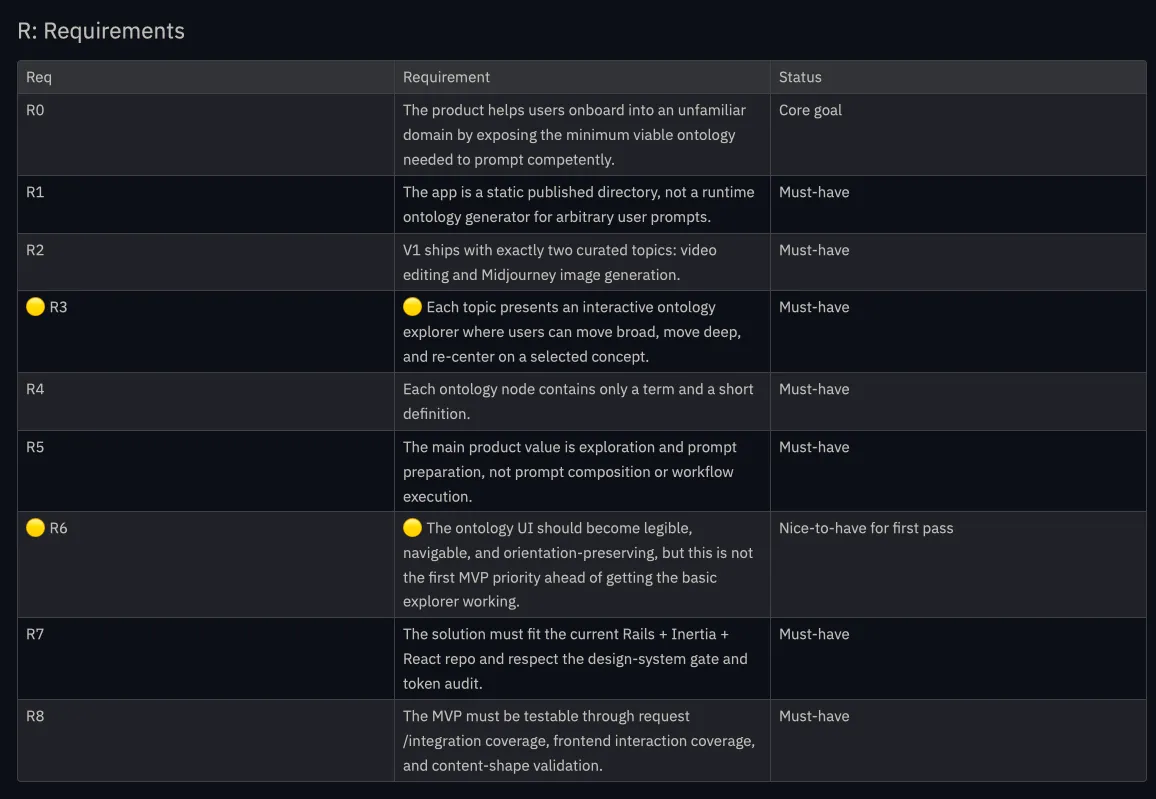
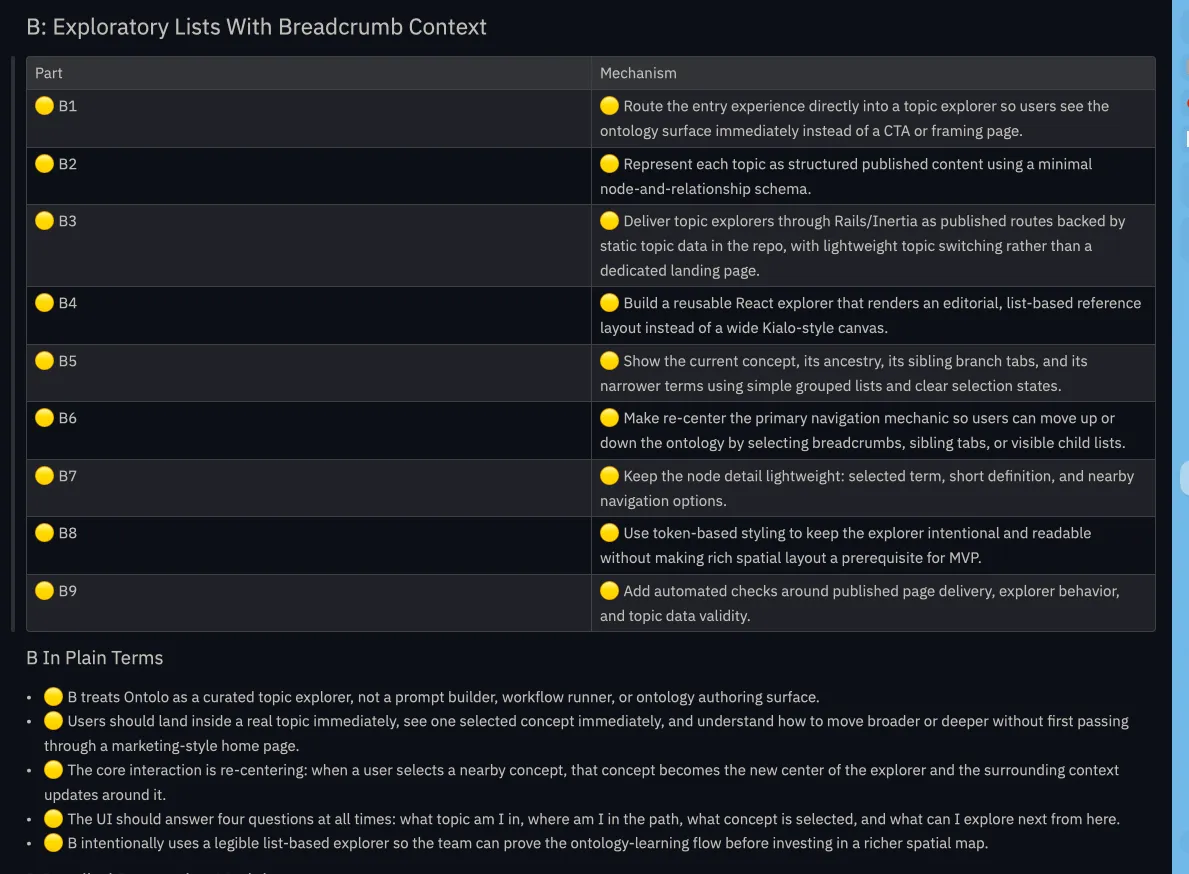
Using the skill, it is possible to have multiple solution directions, and from Ryan Singer’s terminology, it’s called a shape. It’s deliberately called a shape, and I like it as it’s not as tight to consider it as a solution, yet. Each of these shapes has various “elements” that constitute the solution on a high level.
I think this is a subtle but important distinction. A shape is directional, not final. It gives enough form to argue about tradeoffs, but not so much detail that we get prematurely attached to implementation.
Doing a fit check
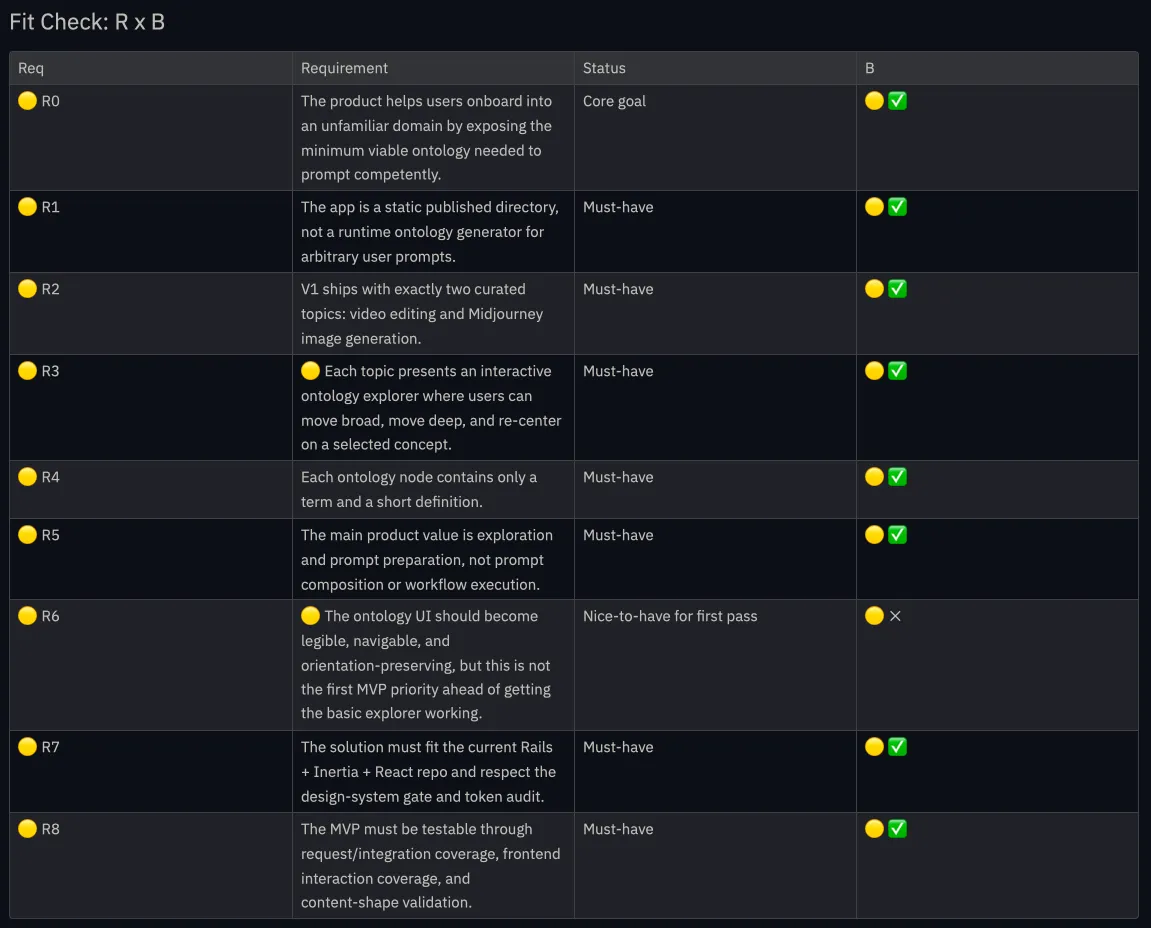
Once you have the requirements (R), and then when you have shapes (A), from the shaping terminology, you do what’s called a fit check. While doing this, some of the shapes don’t match some or all of the requirements which is fine. There are no perfect solutions, only tradeoffs. R x A, is to evaluate if there are any blockers on any directions. This is a neat way to do the core of what, I believe, a true engineer should be doing: to see the constraints and to figure out a way towards the solution despite the constraints.
We have two ways to see: (a) how well the requirements are served by the shape, and (b) how well the shape matches the requirements. This can be quickly dismissed as merely interchanging the sentence from an active one to a passive one, but it’s not quite so. Each of these, is a different view, to give an example, from the ontolo product which I built recently,
eg of a fit check:
Running spikes
This is also a good point where we can ascertain if there are any grey areas which are not very clear yet. If there are any such grey areas, then the best way to know this further is by means of a spike. It also gives us an idea of the most important tech spike we should prioritize first.
Once we do a spike and validate if that direction is feasible, I feed this back to the shaping.md doc. So that we now have all the checkboxes ticked, everything is in green. We can now proceed to the next step, which is to shape the solution better.
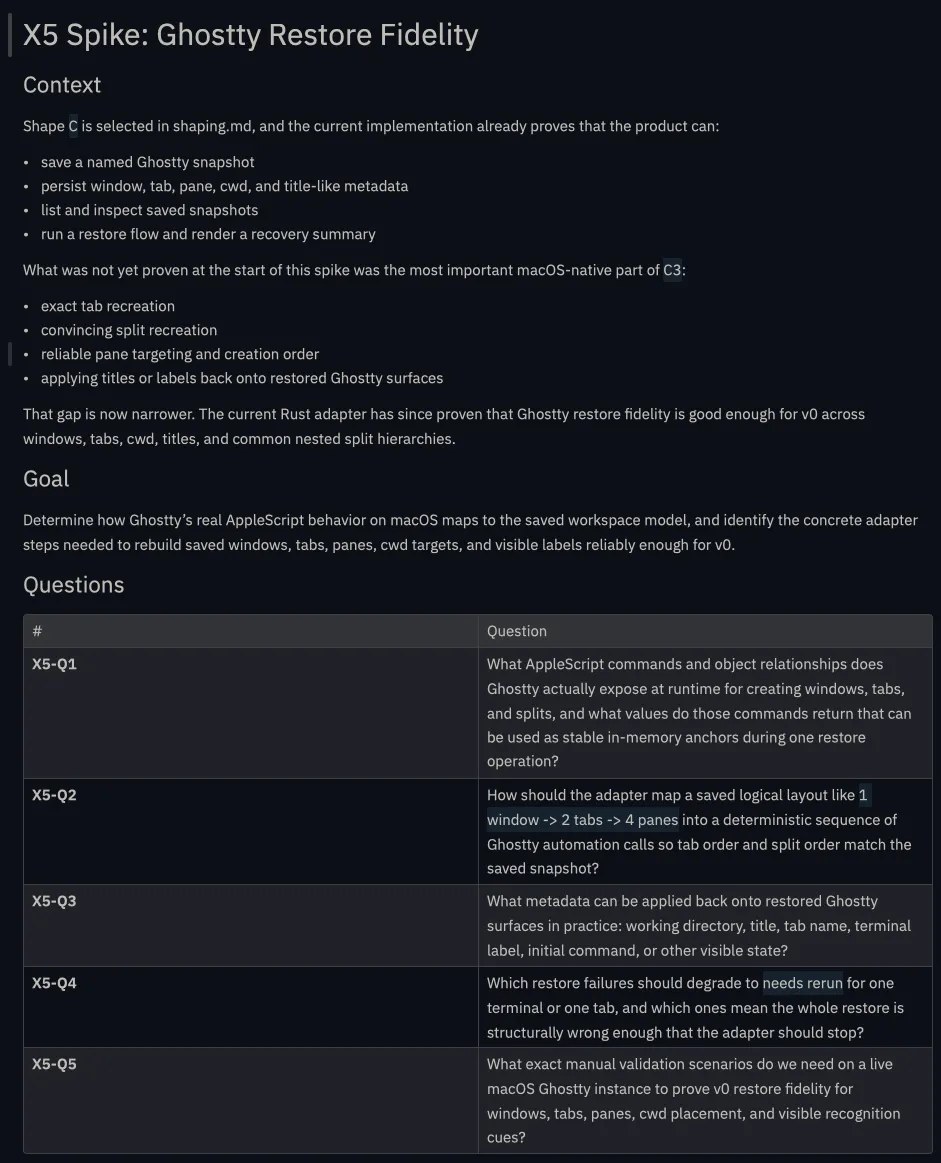
With the skills used along with this, whenever we instruct agents to “spike” something, it automatically comes up with a detailed document that captures the outcomes of the spike, along with the next steps.
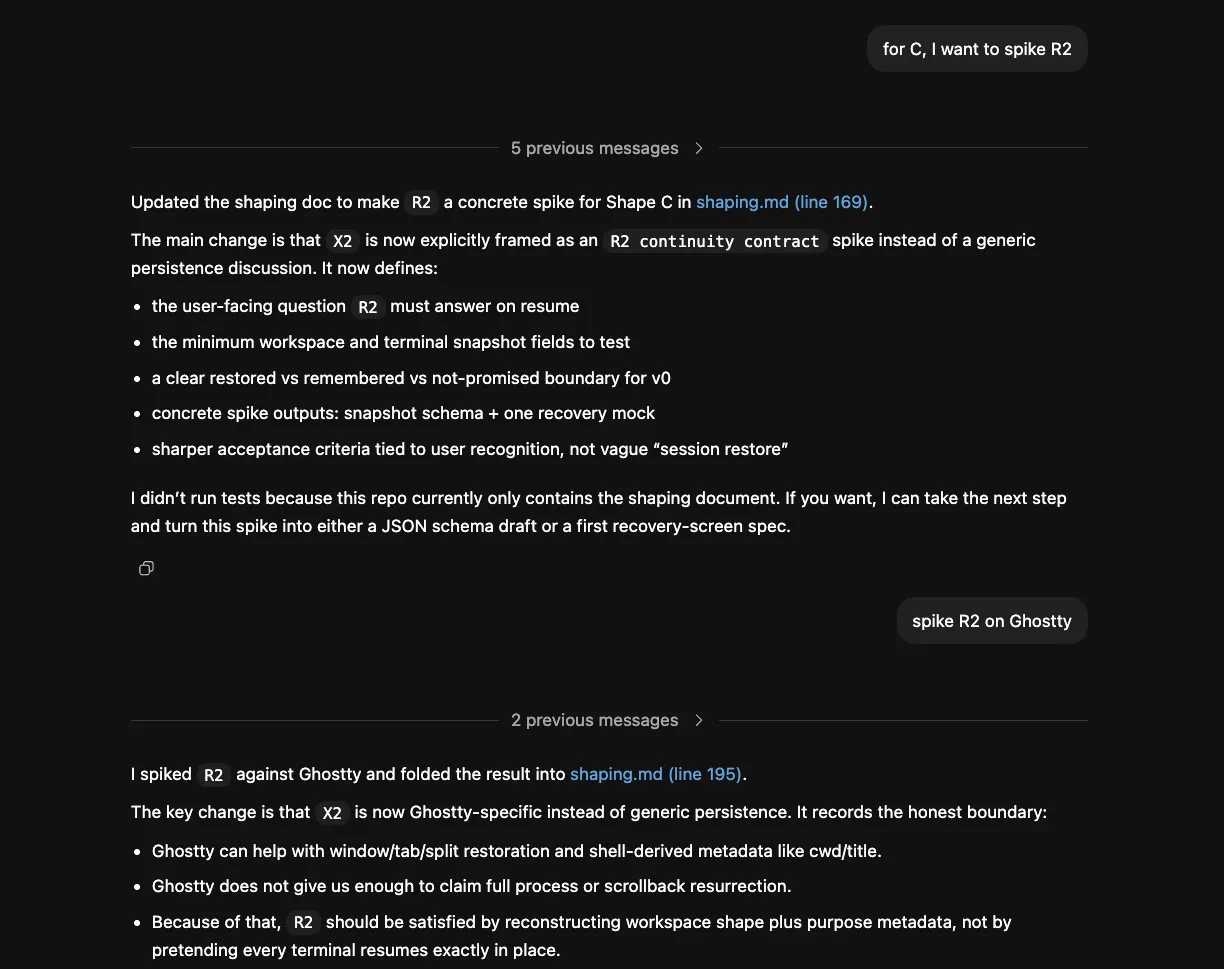
After spiking, you would be getting detailed reports with conclusions from the spike as shown here:
Shaping solutions
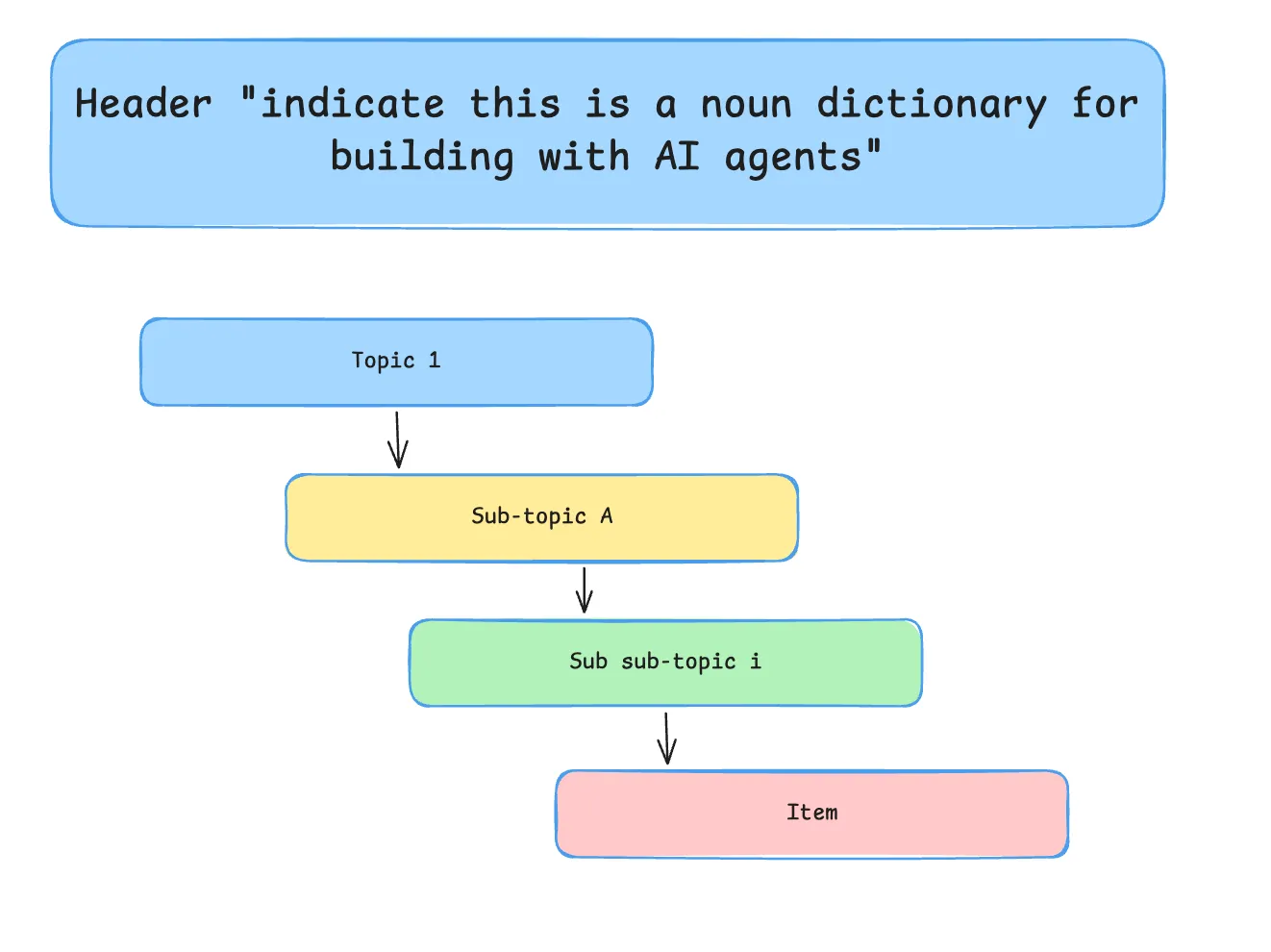
After this is all done, and we have a general concept of a solution, we could either instruct the agents to detail the shape of the solution. And when it does this, we can smell if something is off. When this happens, it’s best to fire up your excalidraw or tldraw canvas and make an L2 fat marker sketch. (I’ve written about what L2 fat marker sketches mean here in this essay)
Between L1 prototypes (paper-napkin sketches) and L4 (Lovable prototypes) you also have a spectrum in between. And I think there are still highly relevant use cases for an “L2 sketch”. For this, I remixed the idea from Jason Freid’s Shape Up Book where he talks about “Fat marker sketches”. It’s still a high-level drawing, but it goes one-level deeper. This balances the need to help people “get” the idea without going too far into detail.
— From the essay, L2 Fat marker sketches
Fat marker sketches
Best to provide multiple screenshots to steer the agents in the right direction if the shaping of the solution seems off. Once done, it’s now time to rewrite the shaping.md file with the feedback provided.
An example of a fat marker sketch:
Breadboarding
The next step in the process is called breadboarding, and it’s deliberately so. Breadboards provide a temporary circuit prototyping surface where engineers could start placing components (eg. resistors, chips, LEDs etc) and connect them with wires without soldering anything permanent. And if we translate the analogy to software, in the same way we have resistors, chips, LEDs and other electronic components, in the software world, we have UI affordances, code components, services and data stores coming together. We can sense how signals move through software as a system.
This is the step that, to me, most strongly separates this process from vague AI-assisted building. Instead of asking the agent to “build the app”, you are showing the agent how the system is wired, where state lives, what talks to what, and where the points of failure might be.
It might look something like this diagram below:
You might not need it for simple toy projects, but it might be useful when things get a bit complicated. My current heuristic is: if there are multiple subsystems, multiple states, or an external service in the mix, breadboarding is probably worth the time.
In this view, you could probably notice something, and this could be iterated further as well.
Slicing and dicing
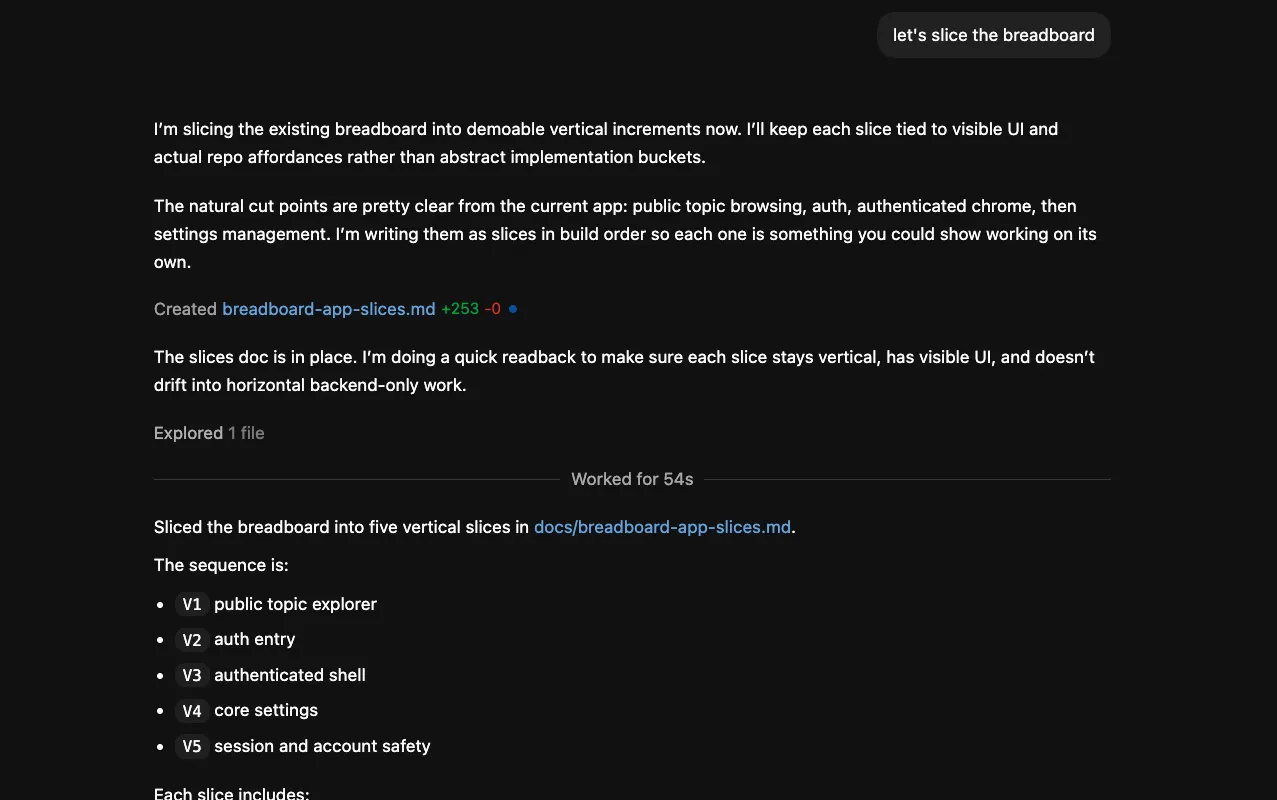
This can now be very easily done, once we have a final shape in the doc. By means of the $breadboarding skill, it breaks it down into multiple slices. Each of these slices is a demoable piece. Another advantage of these vertical slices through the breadboarding format is that they translate extremely well when we create mermaid diagrams, or excalidraw/tldraw versions as well. This helps give quick feedback and improve each of those components of the vertical slice better.
Say, for the ontolo app, I sliced the shape A, into 5 slices, each demoable, verifiable and testable on ones’ own. However, for knowing if the end-to-end integration works or not, we have to wait till the final slice is built for us to know for sure.
For lightweight apps, one could skip breadboarding and slicing altogether, and just ask the agents to come up with the implementation plan, and it might take it up from there in an easy way. But once the app stops being obviously simple, I think slicing becomes important because it restores the human feedback loop. You are no longer waiting for the whole product to materialize before reacting to it.
Optional: Steel threading
Another idea surrounding this thinking, is to do a “horizontal slice”, aka steel-thread. Software engineers have long talked about a “thread” or “string” that runs end‑to‑end through all layers of an application (UI -> services -> database -> external systems) for a single use case. The word “thread” evokes something that weaves through multiple components and ties them together.
Calling it a steel thread emphasizes that this end‑to‑end path should be robust and production‑grade, like a cable or tendon that can carry the weight of future features. It contrasts with a flimsy “spike” or throwaway prototype: the steel thread is thin in scope, but strong and durable.
It is a thin but strong structural element that runs all the way through a system and can support everything you hang on it later
Previously, I was considering to build a “chat with documents app” that connects to MS teams so that an agent can talk to the app for retrieving documents. If I had gone the MVP approach, I would have first built an app, and then built the integration with the MS teams agent. If I were to “steel thread” this, I would first build the end-to-end integration in the least possible way, which also includes the “chat with documents” aspect being available through MS teams, only then would it be truly end to end.
Similarly, for this approach, I could have gone the vertical slice approach to test out the integration across the systems, but in this case, since the implementation of Ontolo didn’t quite require heavy integration work, I skipped steelthreading. This should definitely be done on a case by case basis, depending on the type of project taken up. My rough rule is: if the risk is mostly around feature behavior, slice vertically; if the risk is mostly around systems integration, steel thread first.
Recap..
To summarize what I just did so far, I first started with a vision skill where I started having a conversation with the agent to kind of craft my direction, it needed to be steered towards a particular goalpost. So it’s needed important for us to tell it where the goalpost looks like and where the direction of the goalpost is. So after that conversation ended, I then scoped the problem and the solution together and in a format called as a shaping methodology, where it’s possible for us to have a very tightly constrained problem, but the problem might not be the only problem which we can work on. There might be say a change of scope where we define a different approach towards a solution, and then we might have to update the problem accordingly as well. Sometimes this is also based on what is technically possible, so you might have to run a series of spikes, which you can also see from this process.
Once the spikes are all done and everything is in green tick, you then take it forward by developing an implementation plan. If it’s a small project you can just like detail out one of the approaches into a implementation plan. If it’s a bit more complicated than than that, you can start by breadboarding the solution and slicing them into multiple subsystems.
If it’s even more complicated than that, I start with building a steel thread where I can test an end to end integration across all the subsystems so that I can get a good idea of how things should flow. And after that I start building the individual subsystems based on what I learned from building an integration end to end. While building each of the slices, by design the skill ensures that each subsystem should be independently verifiable and testable, so that the human feedback loop is possible for you to provide. And once you do that, you can slowly start building the other slices. Eventually you’ll complete all the slices as per the breadboarding, and then you have a finished product at the end of the day.
Read more
- Home is where the feeling of home residesreflections
- Notes on doing most good, doing some good, and living goodphilanthropy
- Notes on Londontravel
- 18 key ideas from reading Henrik Karlsson this monthwriting
- Venn-diagram based decision makingmathematics
- Co-creative loops are everywheremental-models
- Life lessons and hot takes from my 30slifestyle
- Building a skill for coherent science illustrationsscience
- My agentic engineering workflow (step by step)agentic-coding
- Hammock driven developmentagentic-coding
- Peculiar ways number three fits into our funny little brainsmental-models
- AI sandwich as a defacto principle for anything agentic engineering relatedagentic-coding
- Authority in the guise of evidencecritical-rationalism
- Map is not the territoryphilosophy
- Self hypnosis as a manifestation ritualmeditation
- Hegelian dialectic for structured reasoning with AI agentsphilosophy
- How I prepare for tough negotiations nowadaysnegotiation
- When should we steelthread somethingproduct-development
- Healthy conflict in teams have a tipping pointteam-building
- How I deslopify AI writingwriting
- How I started building softwares with AI agents being non technicalagentic-coding
- Read raw transcriptswriting
- Legible and illegible tasks in organisationsproduct
- L2 Fat marker sketchesdesign
- Writing as moats for humanswriting
- Beauty of second degree probesdecision-making
- Boundary objects as the new prototypesprototyping
- One way door decisionsproduct
- Finished softwares should existproduct
- How I periodically rank my rough draftsobsidian
- Flipping questions on its headinterviewing
- Vibe writing maximswriting
- How I blog with Obsidian, Cloudflare, AstroJS, Githubwriting
- How I build greenfield apps with AI-assisted codingagentic-coding
- We have been scammed by the Gaussian distribution clubmathematics
- Classify incentive problems into stag hunts, and prisoners dilemmasgame-theory
- I was wrong about optimal stoppingmathematics
- Thinking like a shipmental-models
- Hyperpersonalised N=1 learningeducation
- New mediums for humans to complement superintelligenceagentic-coding
- Maxims for AI assisted codingagentic-coding
- Virtual bookshelvesaesthetics
- It's computational everythingtrends
- Public gardens, secret routesdigital-garden
- Git way of learning to codeagentic-coding
- Style Transfer in AI writingagentic-coding
- Understanding codebases without using codeagentic-coding
- Vibe coding with Cursoragentic-coding
- Virtuoso Guide for Personal Memory Systemsmemory
- Writing in Future Pastwriting
- Publish Originally, Syndicate Elsewhereblogging
- Poetic License of Designdesign
- Idea in the shower, testing before breakfastsoftware
- Technology and regulation have a dance of ice and firetechnology
- How I ship "stuff"software
- Writing is thinkingwriting
- Song of Shapes, Words and Pathscreativity
- How do we absorb ideas better?knowledge
- Read writers who operatewriting
- Brew your ideas lazilyideas
- Trees, Branches, Twigs and Leaves — Mental Models for Writingwriting
- Compound Interest of Private Noteswriting
- Conceptual Compression for LLMsagentic-coding
- Meta-analysis for contradictory research findingsdigital-health
- Proof of workproduct
- Gauging previous work of new joinees to the teamleadership
- Task management for product managersproduct
- Beauty of Zettelswriting
- Stitching React and Rails togetheragentic-coding
- Exploring "smart connections" for note takingwriting
- Deploying Home Cooked Apps with Railssoftware
- Repetitive Copypromptingwriting
- Questions to ask every decadejournalling
- Balancing work, time and focusproductivity
- Hyperlinks are like cashew nutswriting
- Brand treatments, Design Systems, Vibesdesign
- How to spot human writing on the internetwriting
- Can a thought be an algorithm?product
- Opportunity Harvestingcareers
- Everything is a prioritisation problemproduct
- Nowlifestyle
- How I do product roastsproduct
- The Modern Startup Stacksoftware
- In-person vision transmissionproduct
- How might we help children invent for social good?social-design
- The meeting before the meetingmeetings
- Design that's so bad it's actually gooddesign
- Lessons learnt interview prepping for product rolesinterviewing
- Obsessing over personal websitessoftware
- English is the hot new programming languagesoftware
- Better way to think about conflictsrisk-management
- The role of taste in building productsdesign
- Dear enterprises, we're tired of your subscriptionssoftware
- Products need not be user centereddesign
- World's most ancient public health problemsoftware
- Pluginisation of Modern Softwaredesign
- Let's make every work 'strategic'consulting
- Making Nielsen's heuristics more digestibledesign
- Startups are a fertile ground for risk takingentrepreneurship
- Insights are not just a salad of factsdesign
- Minimum Lovable Productproduct
- Methods are lifejackets not straight jacketsmethodology
- How to arrive at on-brand colours?design
- Minto principle for writing memoswriting
- Importance of Whytask-management
- Quality Ideas Trump Executionsoftware
- Why I prefer indie softwareslifestyle
- Use code only if no code failscode
- Self Marketing
- Personal Observation Techniquesdesign
- Design is a confusing worddesign
- A Primer to Service Design Blueprintsdesign
- Rapid Journey Prototypingdesign
- Visualise detailed file structures on CLIcli
- Do's and Don'ts of User Researchdesign
- Design Manifestodesign
- Complex project management for productproducts
- How might we enable patients and caregivers to overcome preventable health conditions?digital-health
- Pedagogy of the Uncharted — What for, and Where to?education
- Future of Equity with Ludovick Petersinterviewing
- Future of Ageing with Mehdi Yacoubiinterviewing
- Future of Tacit knowledge with Celeste Volpiinterviewing
- Future of Mental Health with Kavya Raointerviewing
- Future of unschooling with Che Vanniinterviewing
- Future of Rural Innovation with Thabiso Blak Mashabainterviewing
- Future of work with Laetitia Vitaudinterviewing
- How might we prevent acquired infections in hospitals?digital-health
- The why to endure any howentrepreneurship
- Design education amidst social tribulationsdesign
- How might we assist deafblind runners to navigate?social-design