Idea in the shower, testing before breakfast

Imagine having an idea in the shower and testing it before breakfast? It’s highly plausible now as AI lets you prototype at the speed of thought. Currently, I use Claude Projects and Cursor to build what I call disposable apps: quick prototypes that prove a point (read more in [this essay about vibe coding]([[Vibe coding]])). The magic? No sunk costs. I can write 5,000 lines of code in ten minutes, test it, and throw it away if it doesn’t work. This freedom to experiment has transformed how I solve problems.
Sharing the AI tools I’m currently using (dated 11 Jan, 2025). I have to ‘explicitly’ mention the timestamp as everything, everywhere might change soon, and that’s a big caveat before I share this:
Prototyping
Personally, the biggest gain in my productivity has been in the realm of prototyping.
Especially the ‘prototyping for dummies’ types helping leverage english as a programming language.
I’ve been able to quickly generate disposable apps and interactions, that demonstrate a quick something. Previously to communicate the perceived benefit of that quick-something, I might have had to negotiate with the developers on the perceived cost, effort and marginal benefit. But now, I can get to the prototype even less than the time it takes to schedule a call and discuss requirements with the developers. And as there is no sunk cost, you automatically get into the mode where you can build more and more prototypes, and test them out. (To make things easier, separate the abstractions as much as possible, read more about [this approach in this essay]([[Conceptual Compression for LLMs]]))
Claude Projects has been quite helpful to build all these extraneous stuff that includes documentations, web UIs that do something (massage the JSONs, scrape some elements from a website etc), readily available CSS styles which can be prompted by saying ‘make it look pretty…’, unit tests, DevOps while dealing with Docker containers, Linux commands etc.
I also use Claude projects as my therapist, my health coach, my DevOps engineer for my hobbyist apps deployed online, etc. Because of a shorter context window offered by Claude Projects, I usually split various components of an app into dozens of micro-services, and work with those micro-services using Claude Projects.
When I find myself wanting to get into the weeds, as I still consider myself as an ‘mediocre developer’, I do observe some anti-patterns of being a ‘solution copier’ instead of being a ‘problem solver’ with LLMs. The trick here is not to keep repeating ‘just fix this’ in loop, as and when you see a compilation error. I’ve noticed that Claude/Cursor might also make/break the fundamental logic, which is all the reason why we need to supervise its chain of thought accordingly.
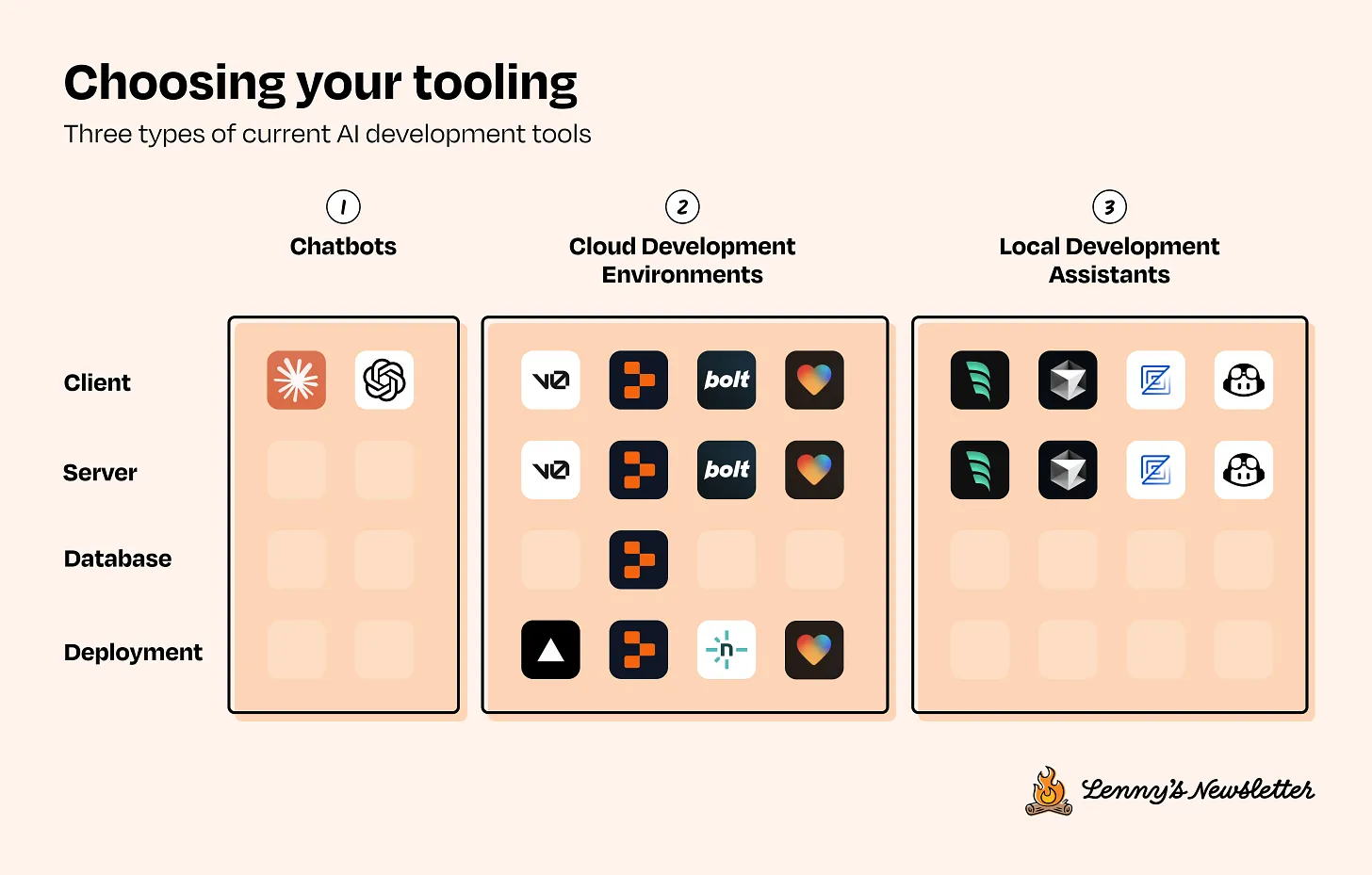
As for Cursor, I’ve been using it as my Local Development Assistant (as described in this guest post by Colin Mathews on the Lennys Newsletter). I’ve been running Cursor’s assistant on the codebase locally using it primarily in three different ways — autocomplete, chat assistant and search.
Autocomplete — This makes me more productive by helping me do more of the grunt work of typing code. As I work primarily with React / Rails and Flutter code, I sometimes forget the syntax and I just ask AI to write the code in the appropriate syntax. I also find myself lazy to sprinkle comments wherever necessary in the code files, and AI does this well.
Search your local codebase — If I have a question about how the files are organised within the codebase, I ask the same, get answers, parse the details and perform the next steps. The benefit of asking questions locally on your codebase is that Cursor has all the context to give more fine tuned inputs (I could try digging Stack overflow, or ask Perplexity/GPT the same, but it would still fall into the same problem of not having enough context of my local codebase). Helps me solve the ‘needle in the haystack’ problem where I have no idea what the code is doing, and I can ask the entire codebase to get some answers.
Chat-driven programming — This is by far, the most difficult and I’m still learning here. The idea is to just use the AI chat to completely build your app without interacting with the files directly. As the outputs are non-deterministic, and the AI changes the output and behavior all the time, it’s a lot of work to get it right.
Search and Research
Semantic search has been a great blessing, and I use AI search liberally across multiple platforms. I use Perplexity Pro for latest-up-to-date information (especially market research, news related, stock insights etc), as this doesn’t have the knowledge cutoff similar to the other tools such as GPT4, Cursor etc. Grok for uncensored, off-the-cuff internet information, Exa.ai for vibe/meaning based search.
I’ve also seen other product managers use Granola to digest all their meetings and ask specific questions based on the meetings they’ve attended. I’m still yet to explore this.
Outputs and UI
The Advanced Voice Mode by OpenAI is quite nice that the conversations flow very naturally. Julian from Linear used it to talk out loud his thinking towards an essay, and it asked him various questions like a true thought partner:
BetterDictation for voice inputs have also been so good. I’ve been using BetterDictation in conjunction with Claude Projects to ask dumb questions fast, as the speed at which you can talk is faster than the speed at which you can write. Personally, it seems to be 5x faster than writing.
Apart from creating documents, better dictations, and better conversational assistance, I’ve also seen great outputs to create frontend.
Instead of making mockups in Figma, I go straight to Vercel’s v0 and prompt my way through creating the entire landing page. More recently, I’ve also observed various startup studios doing the same, bypassing the conventional design system/wireframes/mockups/screens process on Figma, and jumping straight into building the page in its entirely purely through prompts.
To summarise:
Prototyping — Cursor, Claude 3.5 Sonnet (for Chat, Auto completion and codebase search/find), Claude Projects for micro-apps, v0.dev and Lovable for disposable NextJS apps with a ‘quick’ auth/database integration
Read more
- Home is where the feeling of home residesreflections
- Notes on doing most good, doing some good, and living goodphilanthropy
- Notes on Londontravel
- 18 key ideas from reading Henrik Karlsson this monthwriting
- Venn-diagram based decision makingmathematics
- Co-creative loops are everywheremental-models
- Life lessons and hot takes from my 30slifestyle
- Building a skill for coherent science illustrationsscience
- My agentic engineering workflow (step by step)agentic-coding
- Hammock driven developmentagentic-coding
- Peculiar ways number three fits into our funny little brainsmental-models
- AI sandwich as a defacto principle for anything agentic engineering relatedagentic-coding
- Authority in the guise of evidencecritical-rationalism
- Map is not the territoryphilosophy
- Self hypnosis as a manifestation ritualmeditation
- Hegelian dialectic for structured reasoning with AI agentsphilosophy
- How I prepare for tough negotiations nowadaysnegotiation
- When should we steelthread somethingproduct-development
- Breadboarding, shaping, slicing, and steelthreading solutions with AI agentsproduct
- Healthy conflict in teams have a tipping pointteam-building
- How I deslopify AI writingwriting
- How I started building softwares with AI agents being non technicalagentic-coding
- Read raw transcriptswriting
- Legible and illegible tasks in organisationsproduct
- L2 Fat marker sketchesdesign
- Writing as moats for humanswriting
- Beauty of second degree probesdecision-making
- Boundary objects as the new prototypesprototyping
- One way door decisionsproduct
- Finished softwares should existproduct
- How I periodically rank my rough draftsobsidian
- Flipping questions on its headinterviewing
- Vibe writing maximswriting
- How I blog with Obsidian, Cloudflare, AstroJS, Githubwriting
- How I build greenfield apps with AI-assisted codingagentic-coding
- We have been scammed by the Gaussian distribution clubmathematics
- Classify incentive problems into stag hunts, and prisoners dilemmasgame-theory
- I was wrong about optimal stoppingmathematics
- Thinking like a shipmental-models
- Hyperpersonalised N=1 learningeducation
- New mediums for humans to complement superintelligenceagentic-coding
- Maxims for AI assisted codingagentic-coding
- Virtual bookshelvesaesthetics
- It's computational everythingtrends
- Public gardens, secret routesdigital-garden
- Git way of learning to codeagentic-coding
- Style Transfer in AI writingagentic-coding
- Understanding codebases without using codeagentic-coding
- Vibe coding with Cursoragentic-coding
- Virtuoso Guide for Personal Memory Systemsmemory
- Writing in Future Pastwriting
- Publish Originally, Syndicate Elsewhereblogging
- Poetic License of Designdesign
- Technology and regulation have a dance of ice and firetechnology
- How I ship "stuff"software
- Writing is thinkingwriting
- Song of Shapes, Words and Pathscreativity
- How do we absorb ideas better?knowledge
- Read writers who operatewriting
- Brew your ideas lazilyideas
- Trees, Branches, Twigs and Leaves — Mental Models for Writingwriting
- Compound Interest of Private Noteswriting
- Conceptual Compression for LLMsagentic-coding
- Meta-analysis for contradictory research findingsdigital-health
- Proof of workproduct
- Gauging previous work of new joinees to the teamleadership
- Task management for product managersproduct
- Beauty of Zettelswriting
- Stitching React and Rails togetheragentic-coding
- Exploring "smart connections" for note takingwriting
- Deploying Home Cooked Apps with Railssoftware
- Repetitive Copypromptingwriting
- Questions to ask every decadejournalling
- Balancing work, time and focusproductivity
- Hyperlinks are like cashew nutswriting
- Brand treatments, Design Systems, Vibesdesign
- How to spot human writing on the internetwriting
- Can a thought be an algorithm?product
- Opportunity Harvestingcareers
- Everything is a prioritisation problemproduct
- Nowlifestyle
- How I do product roastsproduct
- The Modern Startup Stacksoftware
- In-person vision transmissionproduct
- How might we help children invent for social good?social-design
- The meeting before the meetingmeetings
- Design that's so bad it's actually gooddesign
- Lessons learnt interview prepping for product rolesinterviewing
- Obsessing over personal websitessoftware
- English is the hot new programming languagesoftware
- Better way to think about conflictsrisk-management
- The role of taste in building productsdesign
- Dear enterprises, we're tired of your subscriptionssoftware
- Products need not be user centereddesign
- World's most ancient public health problemsoftware
- Pluginisation of Modern Softwaredesign
- Let's make every work 'strategic'consulting
- Making Nielsen's heuristics more digestibledesign
- Startups are a fertile ground for risk takingentrepreneurship
- Insights are not just a salad of factsdesign
- Minimum Lovable Productproduct
- Methods are lifejackets not straight jacketsmethodology
- How to arrive at on-brand colours?design
- Minto principle for writing memoswriting
- Importance of Whytask-management
- Quality Ideas Trump Executionsoftware
- Why I prefer indie softwareslifestyle
- Use code only if no code failscode
- Self Marketing
- Personal Observation Techniquesdesign
- Design is a confusing worddesign
- A Primer to Service Design Blueprintsdesign
- Rapid Journey Prototypingdesign
- Visualise detailed file structures on CLIcli
- Do's and Don'ts of User Researchdesign
- Design Manifestodesign
- Complex project management for productproducts
- How might we enable patients and caregivers to overcome preventable health conditions?digital-health
- Pedagogy of the Uncharted — What for, and Where to?education
- Future of Equity with Ludovick Petersinterviewing
- Future of Ageing with Mehdi Yacoubiinterviewing
- Future of Tacit knowledge with Celeste Volpiinterviewing
- Future of Mental Health with Kavya Raointerviewing
- Future of unschooling with Che Vanniinterviewing
- Future of Rural Innovation with Thabiso Blak Mashabainterviewing
- Future of work with Laetitia Vitaudinterviewing
- How might we prevent acquired infections in hospitals?digital-health
- The why to endure any howentrepreneurship
- Design education amidst social tribulationsdesign
- How might we assist deafblind runners to navigate?social-design